星期六, 十一月 10, 2012
[C++]直接插入排序
//
// D_InsertSort.cpp
// Sort
//
// Created by pOH7 on 12-11-10.
// Copyright (c) 2012年 pOH7. All rights reserved.
//
//直接插入排序
#include <iostream>
using namespace std;
#define ElemType int
#define MAXSIZE 20
class SqList
{
public:
SqList(ElemType *t, int length)
{
this->length = length;
for (int i = 1; i <= length; ++i)
{
r[i] = t[i - 1];
}
}
void D_InsertSort();
void display();
private:
ElemType r[MAXSIZE + 1];//r[0]作哨兵
int length;
};
void SqList::D_InsertSort()
{
int i, j;
for (i = 2; i <= length; ++i)
{
r[0] = r[i];//r[0] = r[j + 1]
for (j = i - 1; r[0] < r[j]; --j) r[j + 1] = r[j];
r[j + 1] = r[0];//将r[j + 1]插入有序区r[1..j]
}
}
void SqList::display()
{
//cout << "length = " << length << endl;
for (int i = 1; i <= length; ++i)
{
cout << r[i] << " ";
}
cout << endl;
}
int main()
{
ElemType t[] = {2, 4, 6, 8, 7, 1, 4, 1, 5};
int length = sizeof(t) / sizeof(*t);
SqList L(t, length);
L.display();
L.D_InsertSort();
L.display();
return 0;
}
[java]输入星期几的第一个字母来判断一下是星期几,如果第一个字母一样,则继续判断第二个字母
//
// week.java
// week
//
// Created by pOH7 on 12-11-10.
// Copyright © 2012年 pOH7. All rights reserved.
//
//输入星期几的第一个字母来判断一下是星期几,如果第一个字母一样,则继续判断第二个字母
import java.util.Scanner;
public class week
{
public static void main(String[] args)
{
Scanner scan = new Scanner(System.in);
System.out.println("请输入星期的第一个字母");
String str = scan.next();
char c = str.charAt(0);
switch(c)
{
case 'S':
System.out.println("请输入星期的第二个字母");
str = scan.next();
c = str.charAt(0);
switch(c)
{
case 'u':
System.out.println("星期日(Sunday)");
break;
case 'a':
System.out.println("星期六(Saturday)");
break;
default:
System.out.println("输入有误!");
}
break;
case 'M':
System.out.println("星期一(Monday)");
break;
case 'T':
System.out.println("请输入星期的第二个字母");
str = scan.next();
c = str.charAt(0);
switch(c)
{
case 'u':
System.out.println("星期二(Tuesday)");
break;
case 'h':
System.out.println("星期四(Thursday)");
break;
default:
System.out.println("输入有误!");
}
break;
case 'W':
System.out.println("星期三(Wednesday)");
break;
case 'F':
System.out.println("星期五(Friday)");
break;
default:
System.out.println("输入有误!");
}
scan.close();
}
}
星期四, 十月 25, 2012
让 Chrome 默认使用 google.com 搜索
退出Chrome浏览器
⌘+Q
修改Preferences文件

文件路径:
- OS X用户:~\Library\Application Support\Google\Chrome\Default\Preferences
- Windows 7用户:%LOCALAPPDATA%\Google\Chrome\User Data\Default\Preferences
找到以下两行:
"last_known_google_url": "https://www.google.com.hk/",
"last_prompted_google_url": "https://www.google.com.hk/",
将它们改为:
"last_known_google_url": "https://www.google.com/",
"last_prompted_google_url": "https://www.google.com/",
保存
登入 www.google.com/ncr
如果Chrome问你是继续使用google.com,还是切换到你的本地域名,当然选择前者。

Android翻墙教程(基于GoAgent,需root)
安装SmartHosts

推荐 https://play.google.com/store/apps/details?id=mobi.smarthosts
或者 https://code.google.com/p/smarthosts/


安装GAE代理

推荐 https://play.google.com/store/apps/details?id=org.gaeproxy
或者 https://code.google.com/p/gappproxy/

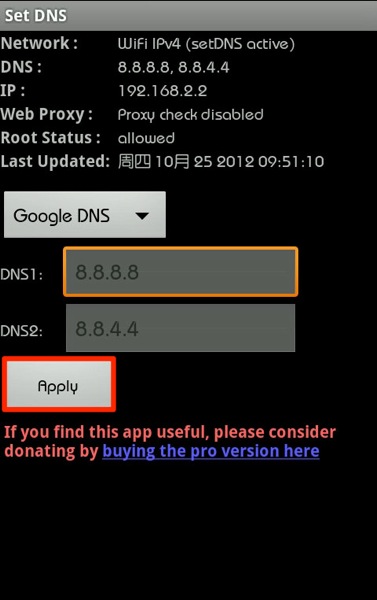
安装Set DNS

https://play.google.com/store/apps/details?id=uk.co.mytechie.setDNS
星期一, 十月 22, 2012


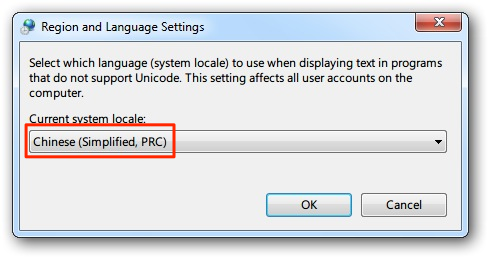

星期一, 十月 08, 2012
解决 Windows 、Mac 和 Ubuntu 时间不一致的问题
相关概念
Universal Time Coordinated (协调世界时)
Greenwich Mean Time (格林尼治平时)
问题原因
Windows 与 Mac/Linux 缺省看待系统硬件时间的方式是不一样的:
- Windows把系统硬件时间当作本地时间(local time),即操作系统中显示的时间跟BIOS中显示的时间是一样的。
- Linux/Unix/Mac把硬件时间当作UTC,操作系统中显示的时间是硬件时间经过换算得来的,比如说北京时间是GMT+8,则系统中显示时间是硬件时间+8。
解决方法:
让 Windows 把硬件时间当作 UTC
开始->运行->CMD,打开命令行程序,在命令行中输入下面命令并回车
Reg add HKLM\SYSTEM\CurrentControlSet\Control\TimeZoneInformation /v RealTimeIsUniversal /t REG_DWORD /d 1
星期三, 九月 05, 2012
GoAgentMAC教程
注册
用Google账号登陆http://appengine.google.com

按照网页提示创建一个或多个Application
部署GoAgent服务器端
下载GoAgent(GoAgent项目地址 https://code.google.com/p/goagent/)

可以将其解压到

用文本编辑器打开local下的proxy.ini
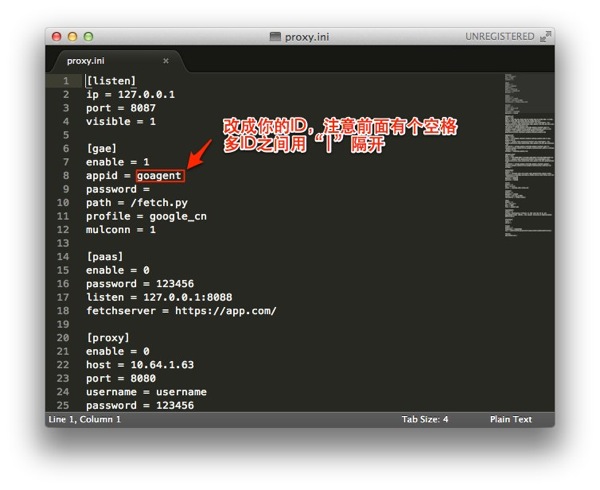
用终端运行
根据提示输入appid,Gmail账号、密码,等待上传完成。
部署GoAgent本地客户端
导入证书
双击local下的CA.crt导入证书,设为总是信任

安装GoAgentMAC
下载地址 https://goagent.googlecode.com/files/GoAgentMac.dmg

用文本编辑器打开Contents下的Info.plist

设置开机启动

浏览器(Chrome)设置
安装 HTTPS Everywhere 和 Proxy SwitchySharp 扩展
Proxy SwitchySharp 设置
导入 http://goagent.googlecode.com/files/SwitchyOptions.bak

系统设置
导出pac文件

放到“站点”文件夹内

开启Web共享
用终端运行 sudo apachectl start
此时用浏览器输入“http://localhost” 可见“It works!”

配置本地自动代理

在下图URL处填入 http://localhost/~用户名/SwitchyPac.pac
